CI/CD for AKS Apps with Azure Pipelines
This guide demonstrates how to implement a production-grade CI/CD pipeline for Kubernetes applications running on Azure Kubernetes Service (AKS) using Azure Pipelines.
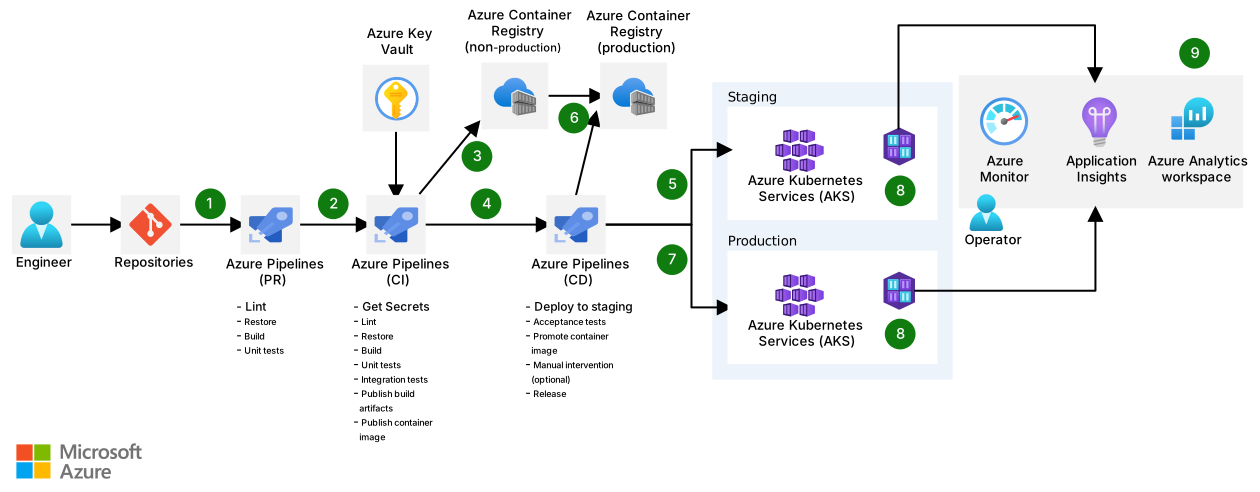
Download a Visio file of this architecture.
Architecture Overview
Dataflow
- A pull request (PR) to Azure Repos Git triggers a PR pipeline. This pipeline runs fast quality checks such as linting, building, and unit testing the code. If any of the checks fail, the PR doesn’t merge. The result of a successful run of this pipeline is a successful merge of the PR.
- A merge to Azure Repos Git triggers a CI pipeline. This pipeline runs the same tasks as the PR pipeline with some important additions. The CI pipeline runs integration tests. These tests require secrets, so this pipeline gets those secrets from Azure Key Vault.
- The result of a successful run of this pipeline is the creation and publishing of a container image in a non-production Azure Container Repository.
- The completion of the CI pipeline triggers the CD pipeline.
- The CD pipeline deploys a YAML template to the staging AKS environment. The template specifies the container image from the non-production environment. The pipeline then performs acceptance tests against the staging environment to validate the deployment. If the tests succeed, a manual validation task is run, requiring a person to validate the deployment and resume the pipeline. The manual validation step is optional. Some organizations will automatically deploy.
- If the manual intervention is resumed, the CD pipeline promotes the image from the non-production Azure Container Registry to the production registry.
- The CD pipeline deploys a YAML template to the production AKS environment. The template specifies the container image from the production environment.
- Container Insights forwards performance metrics, inventory data, and health state information from container hosts and containers to Azure Monitor periodically.
- Azure Monitor collects observability data such as logs and metrics so that an operator can analyze health, performance, and usage data. Application Insights collects all application-specific monitoring data, such as traces. Azure Log Analytics is used to store all that data.
Implementation Guide
Prerequisites
- Azure DevOps organization and project
- Azure subscription with appropriate permissions
- Azure Container Registry
- Azure Kubernetes Service cluster(s) for staging and production environments
- Azure Key Vault for secrets management
- Azure Monitor and Application Insights configured for observability
Step 1: Set Up the Repository Structure
For a well-structured application, organize your repository with the following structure:
├── .azuredevops/
│   ├── pr-pipeline.yml
│   ├── ci-pipeline.yml
│   └── cd-pipeline.yml
├── src/
│   └── [application source code]
├── tests/
│   ├── unit/
│   ├── integration/
│   └── acceptance/
├── kubernetes/
│   ├── base/
│   │   ├── deployment.yml
│   │   ├── service.yml
│   │   └── configmap.yml
│   └── overlays/
│       ├── staging/
│       │   ├── kustomization.yml
│       │   └── config-patch.yml
│       └── production/
│           ├── kustomization.yml
│           └── config-patch.yml
└── Dockerfile
Step 2: Create the PR Pipeline
Create a file named .azuredevops/pr-pipeline.yml for quick validation during pull requests:
trigger: none # Triggered by PR only

pr:
  branches:
    include:
    - main
    - develop
  paths:
    exclude:
    - README.md
    - docs/*

pool:
  vmImage: 'ubuntu-latest'

variables:
  buildConfiguration: 'Release'

stages:
- stage: Validate
  jobs:
  - job: Linting
    steps:
    - task: Bash@3
      displayName: 'Run linting checks'
      inputs:
        targetType: 'inline'
        script: |
          # Example linting command for a Node.js application
          npm install
          npm run lint

  - job: UnitTests
    steps:
    - task: Bash@3
      displayName: 'Run unit tests'
      inputs:
        targetType: 'inline'
        script: |
          # Example test command
          npm install
          npm test -- --coverage

    - task: PublishTestResults@2
      inputs:
        testResultsFormat: 'JUnit'
        testResultsFiles: '**/test-results.xml'

    - task: PublishCodeCoverageResults@1
      inputs:
        codeCoverageTool: 'Cobertura'
        summaryFileLocation: '$(System.DefaultWorkingDirectory)/**/coverage/cobertura-coverage.xml'
Step 3: Implement the CI Pipeline
Create the main CI pipeline in .azuredevops/ci-pipeline.yml with Azure Key Vault integration:
trigger:
  branches:
    include:
    - main
    - develop

pool:
  vmImage: 'ubuntu-latest'

variables:
  - name: imageName
    value: 'your-application'
  - name: nonProdRegistry
    value: 'nonprodregistry.azurecr.io'
  - name: dockerfile
    value: '$(Build.SourcesDirectory)/Dockerfile'
  - group: 'application-variables'

stages:
- stage: Build
  jobs:
  - job: BuildAndTest
    steps:
    - task: AzureKeyVault@2
      displayName: 'Fetch secrets from Key Vault'
      inputs:
        azureSubscription: 'Your-Azure-Service-Connection'
        KeyVaultName: 'your-key-vault'
        SecretsFilter: 'db-connection-string,api-key'
        RunAsPreJob: true

    - task: Bash@3
      displayName: 'Build application'
      inputs:
        targetType: 'inline'
        script: |
          # Build steps for your application
          npm install
          npm run build

    - task: Bash@3
      displayName: 'Run all tests'
      inputs:
        targetType: 'inline'
        script: |
          # Unit and integration tests
          npm test

          # Integration tests may use secrets
          CONNECTION_STRING="$(db-connection-string)" npm run test:integration
      env:
        API_KEY: $(api-key)

    - task: Docker@2
      displayName: 'Build and push container image'
      inputs:
        command: buildAndPush
        containerRegistry: 'NonProdACR'
        repository: '$(imageName)'
        dockerfile: '$(dockerfile)'
        tags: |
          $(Build.BuildNumber)
          latest

    - task: PublishPipelineArtifact@1
      displayName: 'Publish Kubernetes manifests'
      inputs:
        targetPath: '$(Build.SourcesDirectory)/kubernetes'
        artifact: 'manifests'
Step 4: Create the CD Pipeline
Configure the deployment pipeline in .azuredevops/cd-pipeline.yml:
trigger: none

resources:
  pipelines:
  - pipeline: ci-pipeline
    source: CI-Pipeline-Name # Reference to your CI pipeline
    trigger:
      branches:
        include:
        - main

variables:
  - name: nonProdRegistry
    value: 'nonprodregistry.azurecr.io'
  - name: prodRegistry
    value: 'prodregistry.azurecr.io'
  - name: imageName
    value: 'your-application'

stages:
- stage: DeployToStaging
  jobs:
  - deployment: DeployToAKS
    environment: staging
    strategy:
      runOnce:
        deploy:
          steps:
          - download: current
            artifact: manifests

          - task: KubernetesManifest@0
            displayName: 'Deploy to Staging AKS'
            inputs:
              action: 'deploy'
              kubernetesServiceConnection: 'staging-aks-connection'
              namespace: 'staging'
              manifests: '$(Pipeline.Workspace)/manifests/overlays/staging/kustomization.yml'
              containers: '$(nonProdRegistry)/$(imageName):$(resources.pipeline.ci-pipeline.runID)'

          - task: Bash@3
            displayName: 'Run acceptance tests'
            inputs:
              targetType: 'inline'
              script: |
                # Wait for deployment to be ready
                kubectl --namespace staging wait --for=condition=available deployment/your-app --timeout=300s

                # Run acceptance tests against staging URL
                npx playwright test --config=tests/acceptance/playwright.config.js

- stage: ApprovalGate
  dependsOn: DeployToStaging
  jobs:
  - job: WaitForValidation
    displayName: 'Wait for external validation'
    pool: server
    timeoutInMinutes: 4320 # 3 days
    steps:
    - task: ManualValidation@0
      timeoutInMinutes: 1440 # 1 day
      inputs:
        notifyUsers: 'user@example.com'
        instructions: 'Please validate the staging deployment at https://staging.example.com and approve if it meets all criteria.'

- stage: PromoteAndDeployToProduction
  dependsOn: ApprovalGate
  jobs:
  - job: PromoteImage
    displayName: 'Promote image to production registry'
    steps:
    - task: AzureCLI@2
      displayName: 'Copy image to production ACR'
      inputs:
        azureSubscription: 'Your-Production-Azure-Service-Connection'
        scriptType: 'bash'
        scriptLocation: 'inlineScript'
        inlineScript: |
          # Import image from non-prod to prod ACR
          az acr import \
            --name $(prodRegistry) \
            --source $(nonProdRegistry)/$(imageName):$(resources.pipeline.ci-pipeline.runID) \
            --image $(imageName):$(resources.pipeline.ci-pipeline.runID)

  - deployment: DeployToProduction
    dependsOn: PromoteImage
    environment: production
    strategy:
      runOnce:
        deploy:
          steps:
          - download: current
            artifact: manifests

          - task: KubernetesManifest@0
            displayName: 'Deploy to Production AKS'
            inputs:
              action: 'deploy'
              kubernetesServiceConnection: 'prod-aks-connection'
              namespace: 'production'
              manifests: '$(Pipeline.Workspace)/manifests/overlays/production/kustomization.yml'
              containers: '$(prodRegistry)/$(imageName):$(resources.pipeline.ci-pipeline.runID)'
Step 5: Kubernetes Manifests with Kustomize
Use Kustomize to manage environment-specific configurations:
Base Deployment (kubernetes/base/deployment.yml):
apiVersion: apps/v1
kind: Deployment
metadata:
  name: your-application
spec:
  replicas: 1
  selector:
    matchLabels:
      app: your-application
  template:
    metadata:
      labels:
        app: your-application
    spec:
      containers:
      - name: app
        image: your-application:latest
        ports:
        - containerPort: 8080
        resources:
          requests:
            cpu: 100m
            memory: 128Mi
          limits:
            cpu: 500m
            memory: 512Mi
        livenessProbe:
          httpGet:
            path: /health
            port: 8080
          initialDelaySeconds: 30
          periodSeconds: 10
        readinessProbe:
          httpGet:
            path: /ready
            port: 8080
          initialDelaySeconds: 5
          periodSeconds: 5
        envFrom:
        - configMapRef:
            name: your-application-config
Staging Kustomization (kubernetes/overlays/staging/kustomization.yml):
apiVersion: kustomize.config.k8s.io/v1beta1
kind: Kustomization

resources:
- ../../base

namespace: staging

patchesStrategicMerge:
- config-patch.yml

commonLabels:
  environment: staging

replicas:
- name: your-application
  count: 1
Production Kustomization (kubernetes/overlays/production/kustomization.yml):
apiVersion: kustomize.config.k8s.io/v1beta1
kind: Kustomization

resources:
- ../../base

namespace: production

patchesStrategicMerge:
- config-patch.yml

commonLabels:
  environment: production

replicas:
- name: your-application
  count: 3
Step 6: Setting Up Monitoring and Observability
-
Enable Container Insights
Use Terraform to enable Container Insights on your AKS clusters:
resource "azurerm_log_analytics_workspace" "aks" { name = "aks-logs-workspace" location = azurerm_resource_group.aks.location resource_group_name = azurerm_resource_group.aks.name sku = "PerGB2018" retention_in_days = 30 } resource "azurerm_kubernetes_cluster" "aks" { # ... other configuration ... addon_profile { oms_agent { enabled = true log_analytics_workspace_id = azurerm_log_analytics_workspace.aks.id } } } -
Configure Application Insights
Add Application Insights to your application by including the SDK in your code:
// For a Node.js application const appInsights = require('applicationinsights'); appInsights.setup('<INSTRUMENTATION_KEY>') .setAutoDependencyCorrelation(true) .setAutoCollectRequests(true) .setAutoCollectPerformance(true) .setAutoCollectExceptions(true) .setAutoCollectDependencies(true) .setAutoCollectConsole(true) .setUseDiskRetryCaching(true) .setSendLiveMetrics(true) .start(); -
Set Up Azure Monitor Alerts
Configure alerts for critical metrics using Azure Portal or Azure CLI:
az monitor alert create \
  --resource-group myResourceGroup \
  --condition "avg Percentage CPU > 75" \
  --condition-type metric \
  --description "Alert when CPU exceeds 75%" \
  --name high-cpu-usage \
  --resource "/subscriptions/subid/resourceGroups/myResourceGroup/providers/Microsoft.ContainerService/managedClusters/myAKSCluster" \
  --action email admin@contoso.com
Best Practices
Security Best Practices
- Use Azure Key Vault for secrets management
- Never store secrets in pipeline variables, always use Key Vault
- Rotate credentials regularly using automated processes
- Implement vulnerability scanning
- Add a step in your CI pipeline to scan container images:
- task: AzureCLI@2 displayName: 'Scan container image for vulnerabilities' inputs: azureSubscription: 'Your-Azure-Service-Connection' scriptType: 'bash' scriptLocation: 'inlineScript' inlineScript: | az acr run --registry $(nonProdRegistry) --cmd 'trivy image $(nonProdRegistry)/$(imageName):$(Build.BuildNumber)' /dev/null - Ensure least privilege access
- Configure service connections with minimal required permissions
- Use managed identities where possible
Deployment Best Practices
- Progressive delivery
- Consider implementing blue/green or canary deployments for zero-downtime updates
- Example Kubernetes manifest for blue/green deployment:
apiVersion: argoproj.io/v1alpha1 kind: Rollout metadata: name: your-application spec: replicas: 3 selector: matchLabels: app: your-application strategy: blueGreen: activeService: your-application-active previewService: your-application-preview autoPromotionEnabled: false - Implement infrastructure as code
- Store Kubernetes manifests and infrastructure configuration in version control
- Use Terraform or Bicep for infrastructure provisioning
- Automation
- Automate all deployment steps to reduce human error
- Include automated rollback mechanisms in your pipelines
Performance and Reliability
- Resource requests and limits
- Always specify CPU and memory requests/limits in your Kubernetes manifests
- Base these on actual performance metrics from monitoring
- Implement health checks
- Add readiness and liveness probes to all containers
- Configure appropriate timeouts and failure thresholds
- Horizontal Pod Autoscaling
- Set up HPA to automatically scale based on resource usage:
apiVersion: autoscaling/v2
kind: HorizontalPodAutoscaler
metadata:
  name: your-application
spec:
  scaleTargetRef:
    apiVersion: apps/v1
    kind: Deployment
    name: your-application
  minReplicas: 1
  maxReplicas: 10
  metrics:
  - type: Resource
    resource:
      name: cpu
      target:
        type: Utilization
        averageUtilization: 70
Troubleshooting
Common Issues and Solutions
- Container image pull failures
- Ensure service connections have proper permissions to ACR
- Verify image names and tags are correct
- Check if production AKS can access the production ACR
- Pipeline permission problems
- Review service connection scopes and permissions
- Ensure pipeline identity has the required RBAC roles
- Kubernetes deployment failures
- Use
kubectl describe pod <pod-name>to diagnose issues - Check for resource constraints or configuration problems
- Use
Monitoring and Debugging Tips
- Real-time log analysis
- Use Azure Log Analytics to create queries for troubleshooting:
ContainerLog | where TimeGenerated > ago(1h) | where ContainerName == 'your-application' | where LogEntry contains "error" | project TimeGenerated, LogEntry | order by TimeGenerated desc - Performance tracking
- Create custom dashboards in Azure Monitor to track key metrics
- Set up alerts for abnormal patterns
Next Steps
- Implement GitOps with Azure Arc or Flux for declarative deployments
- Consider adding policy enforcement with Open Policy Agent or Gatekeeper
- Explore advanced deployment patterns such as canary releases with Azure Service Mesh