Blue-Green Deployments
The DevOps Deployment Comedy Corner
Blue/Green Deployment Meeting:

PM:     "How's the deployment going?"
Dev:    "Well, Blue works fine..."
Ops:    "And Green is ready..."
PM:     "So we're good to switch?"
Dev:    "Theoretically..."
Ops:    "Practically..."
Both:   "Maybe we should test it one more time?"
PM:     ¯\_(ツ)_/¯

*3 hours and 15 coffee cups later*

Monitor: [99.99% uptime achieved]
Remember: In DevOps, we don’t have problems, we have “unplanned learning opportunities”
Suppose we have a PaymentService:v1.0.0 (that is called Blue) running on our kubernetes cluster:
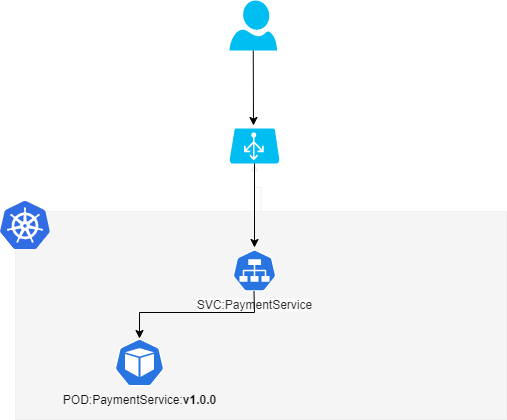
PaymentService:v1.0.0 serving the users requests
From here, the new version PaymentService:v1.1.0 (that is called Green) is deployed next to the old version without affecting its:
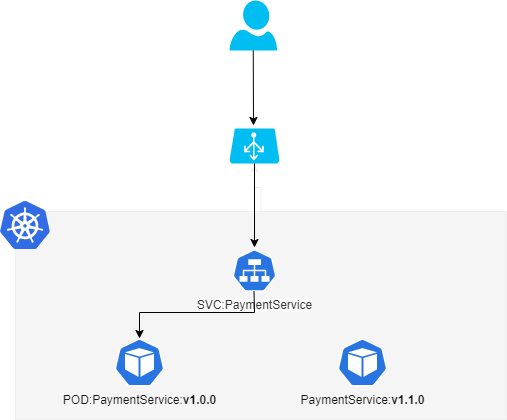
PaymentService:v1.1.0 is deployed next to the old version without affecting its
The new version of the application is deployed and can be tested for functionality and performance.
Once the testing results are successful, application traffic is switched from blue to green:
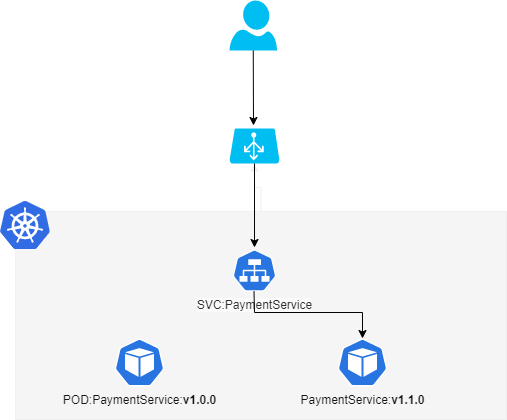
Green then becomes the new production
Let’s try it now!
What is Argo Rollouts?
We use Terraform and an argo terraform module that I have implemented in order to deploy Argo products.
Terraform-Argo-Module
modules/kubernetes_modules/argo/argo_rollouts.tf
```plaintext resource “helm_release” “argo_rollouts” {
for_each = var.argo_rollouts != null ? toset([“devops”]) : toset([])
name = var.argo_rollouts.name
repository = “https://argoproj.github.io/argo-helm” chart = “argo-rollouts” version = var.argo_rollouts.version namespace = “argo-rollouts” create_namespace = true
dynamic “set” { for_each = var.argo_rollouts.sets
content {
    name = set.key
    value = set.value
}   }
values = var.argo_rollouts.values } ```plaintext
modules/kubernetes_modules/argo/variables.tf
```plaintext variable “argo_rollouts” {
type = object({
    name = string
    sets = optional(map(string), {})
    values = optional(set(string), [])
    version = optional(string)

})

default = null } ```plaintext
Blue Green Example Project
examples/bluegreen/main.tf
```plaintext module “argo” {
source = "../../modules/kubernetes_modules/argo"

argo_rollouts = {
    name = "lupass"
    version = "2.31.0"

    values = [
        yamlencode(
            {
                dashboard = {
                    enabled = true
                    service = {
                        type = "LoadBalancer"
                    }
                }
            }
        )
    ]
} } ```plaintext
Remember to define providers.tf in order to use kubernetes and helm providers and to connect to your cluster.
```plaintext provider “kubernetes” { config_path = “~/.kube/config”
}
provider “helm” { kubernetes { config_path = “~/.kube/config” } } ```plaintext
Running terraform apply, we deploy Argo Rollouts on our target cluster.
Deploy Application to test blue green deployment
To obtain the advanced deployments capabilities, we need to specify our Application Manifest via Argo Rollout CRD: Rollout. It is the same of Kubernetes deployments plus a strategy block with which you can define your deployment strategy:
```plaintext
resource “kubernetes_namespace” “my_app” {
metadata  {
    name = "my-app"
} }
resource “kubernetes_manifest” “super_hello” {
manifest = { apiVersion = “argoproj.io/v1alpha1” kind = “Rollout” metadata = { name = “super-hello” namespace = kubernetes_namespace.my_app.metadata.0.name
}

spec = {
    replicas = 3
    revisionHistoryLimit = 6
    selector = {
        matchLabels = {
            "app" = "super-hello"
        }
    }
    template = {
        metadata = {
            labels = {
                "app" = "super-hello"
            }
        }
        spec = {
            containers = [
                {
                    name = "super-hello"
                    image = "ghcr.io/gbaeke/super:1.0.2"
                    env = [
                        {
                            name = "WELCOME"
                            value = "VERSION V2"
                        }
                    ]
                    imagePullPolicy = "Always"
                    resources = {
                        requests = {
                            memory = "128Mi"
                            cpu = "50m"
                        }
                        limits = {
                            memory = "128Mi"
                            cpu = "50m"
                        }
                    }
                    readinessProbe = {
                        httpGet = {
                            path = "/healthz"
                            port = "8080"
                            initialDelaySeconds = 3
                            periodSeconds = 3
                        }
                    }
                }
            ]
        }
    }
    strategy = {
        blueGreen = {
            activeService = kubernetes_service_v1.blue_green_prod.metadata.0.name
            previewService = kubernetes_service_v1.blue_green_preview.metadata.0.name
            autoPromotionEnabled = false
        }
    }
}
}
field_manager { force_conflicts = true }
}
resource “kubernetes_service_v1” “blue_green_prod” {
metadata {
    name = "super-hello-prod"
    namespace = kubernetes_namespace.my_app.metadata.0.name
}

spec {
    selector = {
      "app" = "super-hello"
    }

    port {
        port = 8088
        target_port = 8080
    }
    type = "LoadBalancer"
}   lifecycle {
    ignore_changes = [
        metadata.0.annotations["argo-rollouts.argoproj.io/managed-by-rollouts"],
        spec.0.selector["rollouts-pod-template-hash"],
    ]
} }
resource “kubernetes_service_v1” “blue_green_preview” {
metadata {
    name = "super-hello-preview"
    namespace = kubernetes_namespace.my_app.metadata.0.name
}

spec {
    selector = {
      "app" = "super-hello"
    }

    port {
        port = 8089
        target_port = 8080
    }
    type = "LoadBalancer"
}   lifecycle {
    ignore_changes = [
        metadata.0.annotations["argo-rollouts.argoproj.io/managed-by-rollouts"],
        spec.0.selector["rollouts-pod-template-hash"],
    ]
} } ```plaintext
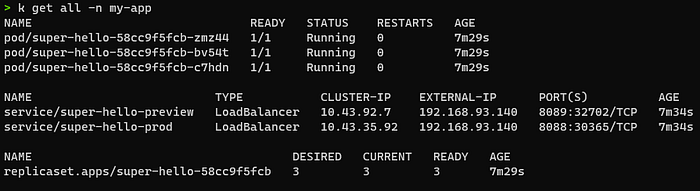
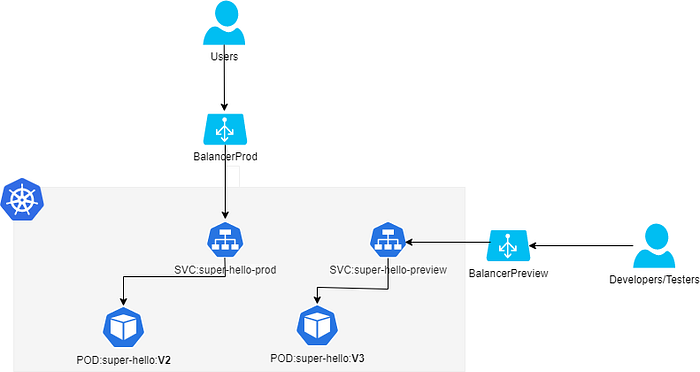
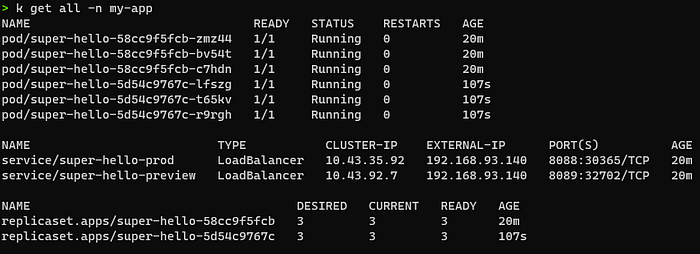
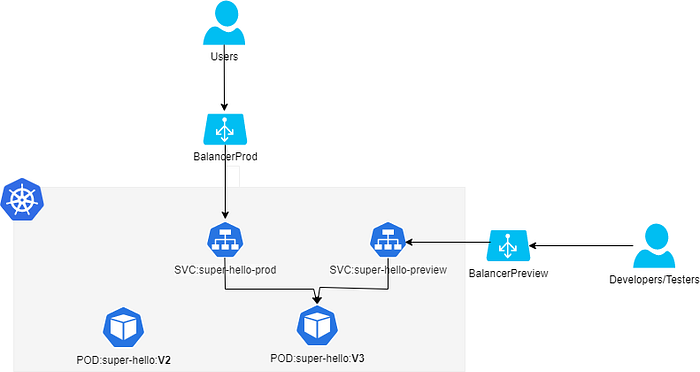
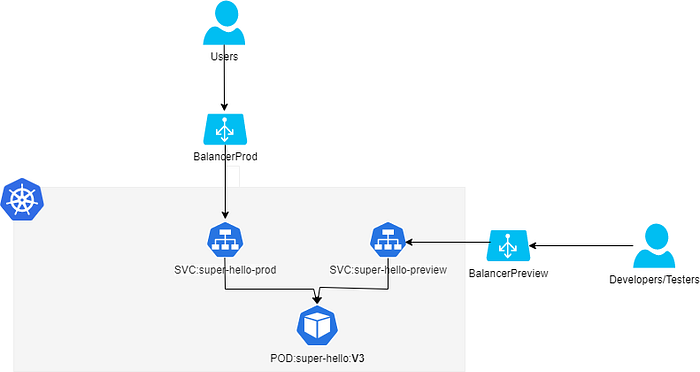
After that we have (for simplicity we draw only one pod in the image):
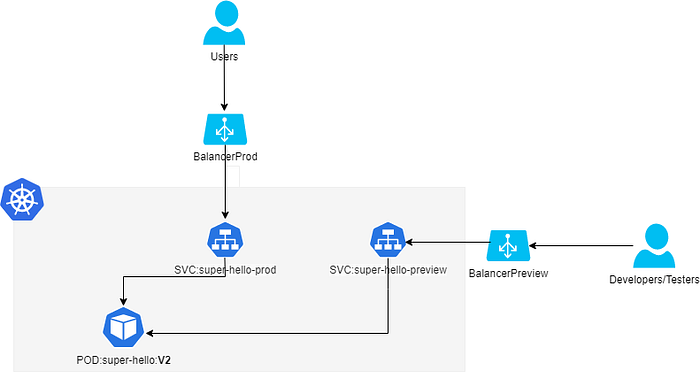
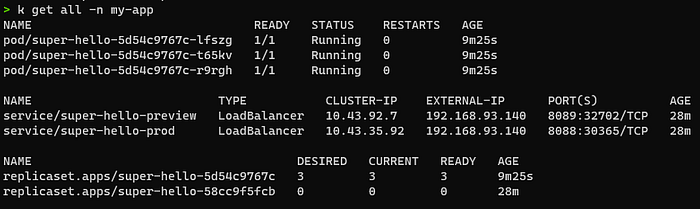
kubectl get all -n my-app
The SVC suer-hello-prod (and BalancerProd) is used for production traffic, instead of super-hello-preview (and Balancer Preview) that can be used in order to test future updates by Developers/Testers/SRE/…
If we do a HTTP GET request to BalancerProd:
plaintext
curl http://192.168.93.140:8088 && echo
VERSION V2
plaintext
And also it is exposed on preview side via BalancerPreview:
plaintext
curl http://192.168.93.140:8089 && echo
VERSION V2
plaintext
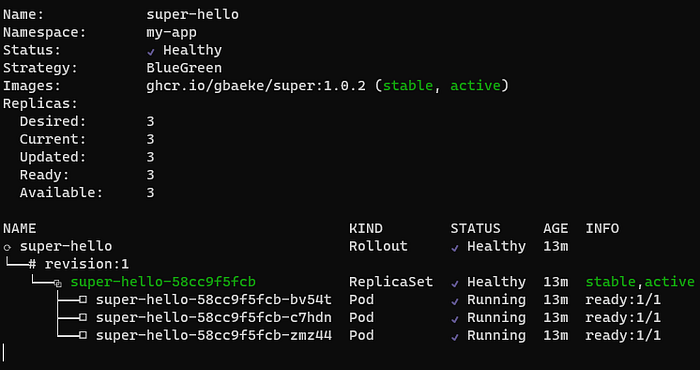
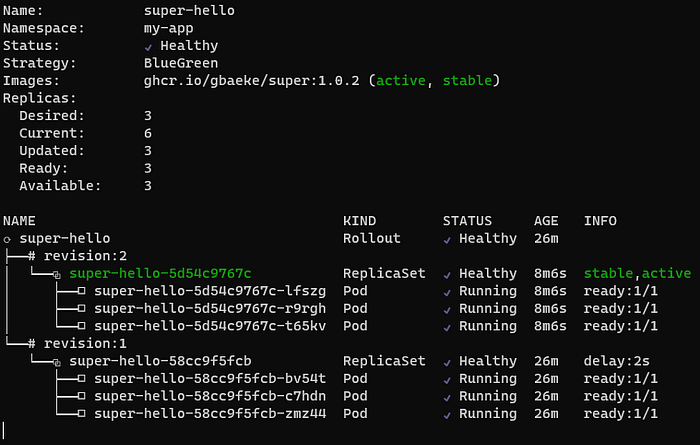
To see the status of our application , there is also
kubectl argo rollouts get rollout bluegreen-demo -n my-app — watch:
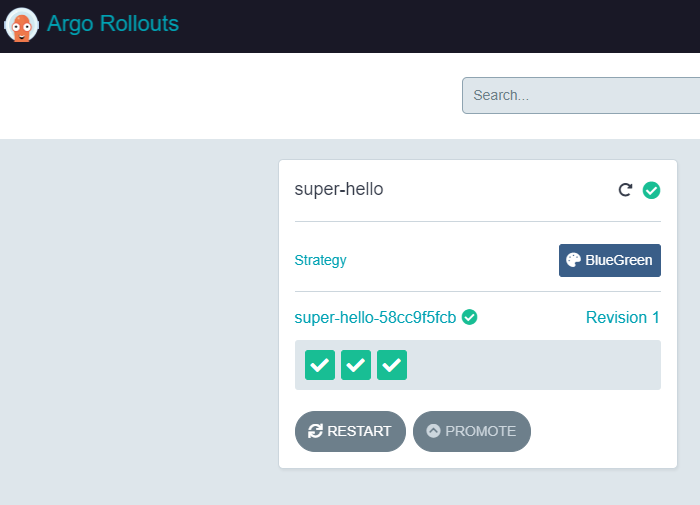
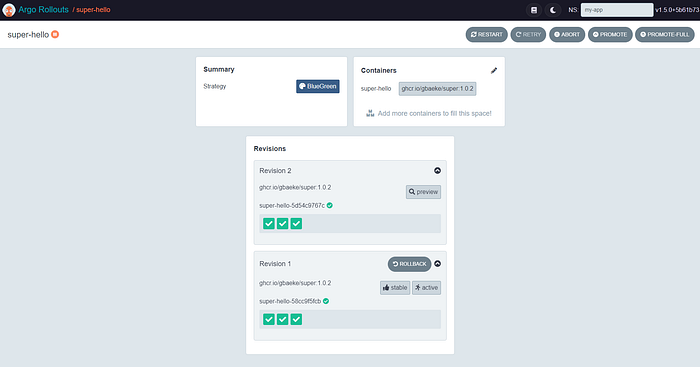
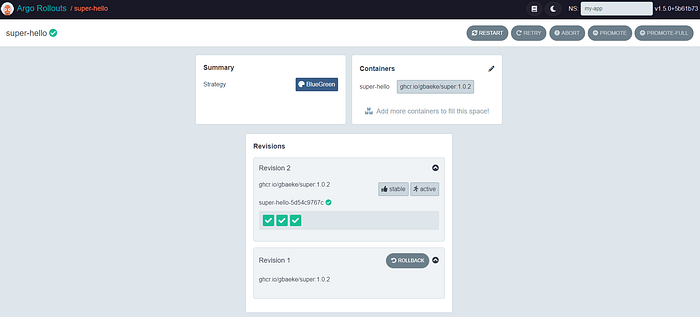
From Argo Rollout Dashboard UI:
Now, we update our manifest setting MESSAGE env variable with value “VERSION V3”
N.B: The image tag remains the same (1.0.2), but what we change is the MESSAGE that returns (from V2 to V3). But it’s the same if we change the tag version.
At this point, the Argo Rollout detect the changes and apply the strategy defined in the desired state of our Rollout Manifest.
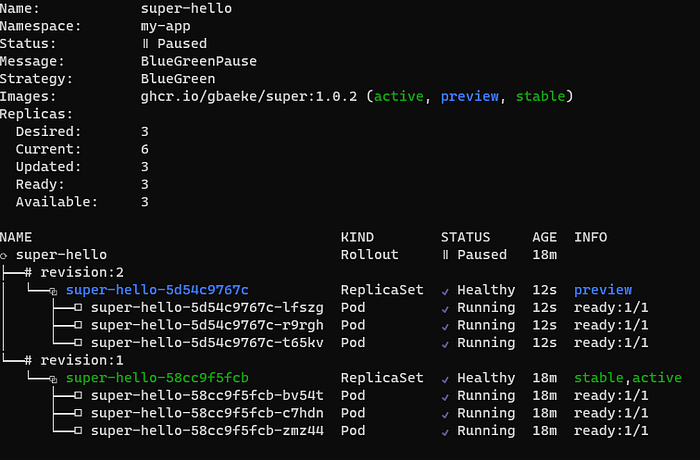
As we can see, now we have this situation:
kubectl argo rollouts get rollout super-hello -n my-app — watch
Argo Rollouts Dashboard UI
k get all -n my-app
curl BalancerProd
plaintext
 curl http://192.168.93.140:8088 && echo
VERSION V2
plaintext
curl BalancerPreview
plaintext
curl http://192.168.93.140:8089 && echo
VERSION V3
plaintext
Once tested the functionality and the performance of super-hello:V3, we can promote the rollout and so switching to use super-hello:V3 in production:
```plaintext
kubectl argo rollouts promote super-hello rollout ‘super-hello’ promoted ```plaintext
So we have:
kubectl argo rollouts get
Argo Rollouts Dashboard UI
k get all -n my-app
curl BalancerProd
plaintext
curl http://192.168.93.140:8088 && echo
VERSION V3
plaintext
curl BalancerPreview
plaintext
curl http://192.168.93.140:8089 && echo
VERSION V3
plaintext
Finaly, the old super-hello:V2 is destroyed:
This way you can minimize downtime possibilities by ensuring service availability during updates. In contrast to blue-green deployments, there are canary deployments that allow a gradual upgrade between versions.