CI/CD for AKS Apps with Azure Pipelines
This guide provides actionable, real-life DevOps patterns for deploying applications to Azure Kubernetes Service (AKS) using Azure Pipelines. It covers best practices, step-by-step YAML examples, and common pitfalls for both PR-driven and GitOps workflows.
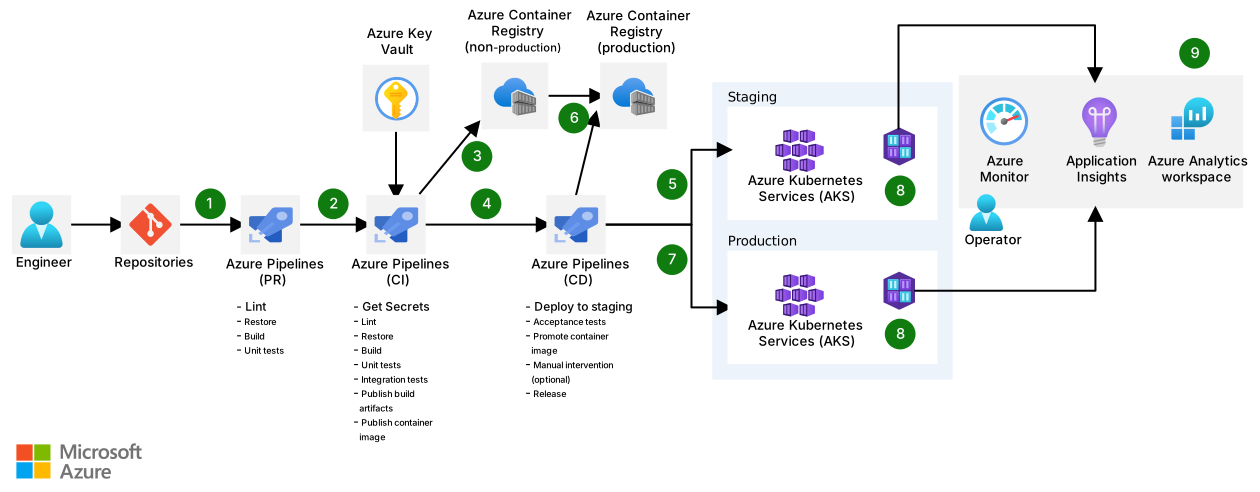
Download a Visio file of this architecture.
Dataflow
- A pull request (PR) to Azure Repos Git triggers a PR pipeline for linting, build, and unit tests. Failed checks block merging.
- A merge triggers a CI pipeline, which runs integration tests (using secrets from Azure Key Vault), builds, and pushes a container image to a non-production Azure Container Registry (ACR).
- The CI pipeline completion triggers the CD pipeline.
- The CD pipeline deploys to a staging AKS environment using a YAML manifest and runs acceptance tests. Optionally, a manual validation step is required before proceeding.
- If approved, the CD pipeline promotes the image to the production ACR and deploys to the production AKS environment.
- Container Insights and Azure Monitor collect and forward logs, metrics, and health data for observability.
Step-by-Step: Azure Pipelines YAML Example
azure-pipelines.yml
trigger:
  branches:
    include:
      - main
pr:
  branches:
    include:
      - main

variables:
  imageName: 'myapp'
  acrName: 'myacr.azurecr.io'

stages:
- stage: Build
  jobs:
  - job: Build
    pool:
      vmImage: 'ubuntu-latest'
    steps:
    - checkout: self
    - task: Docker@2
      displayName: Build and push image
      inputs:
        command: buildAndPush
        repository: $(acrName)/$(imageName)
        dockerfile: Dockerfile
        tags: $(Build.BuildId)
    - publish: $(System.DefaultWorkingDirectory)/k8s
      artifact: manifests

- stage: Deploy_Staging
  dependsOn: Build
  jobs:
  - deployment: DeployStaging
    environment: 'aks-staging'
    pool:
      vmImage: 'ubuntu-latest'
    strategy:
      runOnce:
        deploy:
          steps:
          - download: current
            artifact: manifests
          - task: KubernetesManifest@1
            displayName: Deploy to AKS Staging
            inputs:
              action: deploy
              manifests: $(Pipeline.Workspace)/manifests/deployment.yaml
              containers: |
                $(acrName)/$(imageName):$(Build.BuildId)
          - task: AzureKeyVault@2
            inputs:
              connectedServiceName: 'AzureServiceConnection'
              keyVaultName: 'my-keyvault'
              secretsFilter: '*'
          - script: |
              # Run acceptance tests here
              echo "Running acceptance tests..."

- stage: Manual_Validation
  dependsOn: Deploy_Staging
  jobs:
  - job: ManualValidation
    pool:
      vmImage: 'ubuntu-latest'
    steps:
    - task: ManualValidation@0
      inputs:
        notifyUsers: 'devops-team@example.com'
        instructions: 'Please validate the staging deployment before promoting to production.'

- stage: Deploy_Production
  dependsOn: Manual_Validation
  condition: succeeded()
  jobs:
  - deployment: DeployProduction
    environment: 'aks-production'
    pool:
      vmImage: 'ubuntu-latest'
    strategy:
      runOnce:
        deploy:
          steps:
          - download: current
            artifact: manifests
          - task: KubernetesManifest@1
            displayName: Deploy to AKS Production
            inputs:
              action: deploy
              manifests: $(Pipeline.Workspace)/manifests/deployment.yaml
              containers: |
                $(acrName)/$(imageName):$(Build.BuildId)
Best Practices
- Use semantic version tags for images (avoid
latestin production). - Store Kubernetes manifests and pipeline YAML in version control.
- Use Azure Key Vault for secrets and inject them at runtime.
- Automate rollbacks on failed deployments.
- Enable monitoring and alerting with Azure Monitor and Container Insights.
- Use branch protection and PR validation for quality gates.
Common Pitfalls
- Manual changes to AKS outside of CI/CD (causes drift).
- Not updating image tags in manifests (leads to stale deployments).
- Hardcoding secrets in pipeline YAML or manifests.
- Skipping acceptance tests or manual validation in production workflows.