CI/CD for AKS Apps with GitHub Actions and GitFlow
This guide provides actionable, real-life DevOps patterns for deploying applications to Azure Kubernetes Service (AKS) using GitHub Actions and GitFlow. It covers both push-based and pull-based (GitOps) CI/CD strategies, with best practices, step-by-step instructions, and common pitfalls.
Option 1: Push-based CI/CD
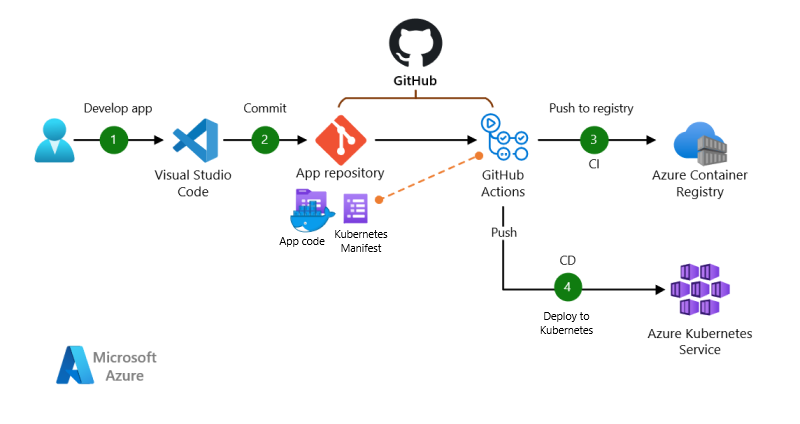
Push-based architecture with GitHub Actions for CI and CD.
Dataflow:
- The app code is developed and committed to a GitHub repository.
- GitHub Actions builds a container image and pushes it to Azure Container Registry (ACR).
- GitHub Actions deploys the app to AKS using
kubectland Kubernetes manifests.
Step-by-Step Example:
# .github/workflows/deploy.yml
name: CI/CD Pipeline
on:
  push:
    branches: [ main ]
jobs:
  build-and-deploy:
    runs-on: ubuntu-latest
    steps:
      - uses: actions/checkout@v3
      - name: Set up Docker Buildx
        uses: docker/setup-buildx-action@v3
      - name: Log in to Azure
        uses: azure/login@v1
        with:
          creds: ${{ secrets.AZURE_CREDENTIALS }}
      - name: Build and push image
        uses: docker/build-push-action@v5
        with:
          context: .
          push: true
          tags: myregistry.azurecr.io/myapp:${{ github.sha }}
      - name: Set up kubectl
        uses: azure/setup-kubectl@v3
      - name: Deploy to AKS
        run: |
          kubectl apply -f k8s/deployment.yaml
          kubectl apply -f k8s/service.yaml
Best Practices:
- Use semantic version tags for images (avoid
latestin production). - Store Kubernetes manifests in version control.
- Use GitHub Secrets for credentials.
- Automate rollbacks on failed deployments.
Common Pitfalls:
- Manual changes to AKS outside of CI/CD (causes drift).
- Not updating image tags in manifests (leads to stale deployments).
Option 2: Pull-based CI/CD (GitOps)
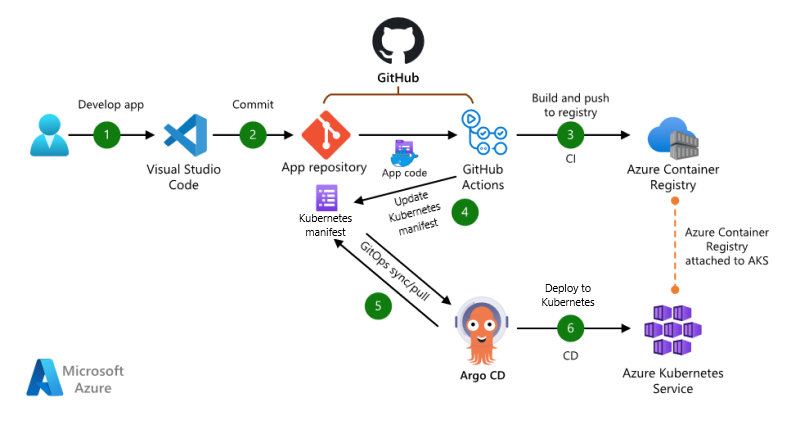
Pull-based architecture with GitHub Actions for CI and Argo CD for CD.
Dataflow:
- The app code is developed and committed to a GitHub repository.
- GitHub Actions builds a container image and pushes it to ACR.
- GitHub Actions updates the Kubernetes manifest in a GitOps repo with the new image tag.
- Argo CD (running in AKS) detects the change and syncs the deployment.
Step-by-Step Example:
# .github/workflows/update-manifest.yml
name: Update K8s Manifest
on:
  push:
    branches: [ main ]
jobs:
  update-manifest:
    runs-on: ubuntu-latest
    steps:
      - uses: actions/checkout@v3
      - name: Update image tag in manifest
        run: |
          sed -i "s|image: myregistry.azurecr.io/myapp:.*|image: myregistry.azurecr.io/myapp:${{ github.sha }}|" k8s/deployment.yaml
      - name: Commit and push manifest
        run: |
          git config user.name "github-actions"
          git config user.email "github-actions@github.com"
          git add k8s/deployment.yaml
          git commit -m "Update image tag to ${{ github.sha }}"
          git push
Best Practices:
- Use a separate GitOps repo for manifests managed by Argo CD.
- Enable auto-sync and health checks in Argo CD.
- Use branch protection and PR reviews for manifest changes.
Common Pitfalls:
- Manual changes in the cluster (causes drift from Git).
- Not monitoring Argo CD sync status or health.