Azure DevOps Trivy sans
Complete YAML
```yaml trigger:
- master
resources:
- repo: self
variables: trivyVersion: 0.9.2 tag: ‘azuredevops-$(Build.BuildNumber)’ imageName: ‘project/container-scanning-demo’
stages:
- stage: Build
displayName: Build, Scan and Push image
jobs:
- job: Build
displayName: Build, Scan and Push
pool:
vmImage: ‘ubuntu-latest’
steps:
-
task: Docker@2 displayName: Build an image inputs: containerRegistry: ‘Docker hub’ repository: ‘$(imageName)’ command: ‘build’ Dockerfile: ‘**/Dockerfile’ buildContext: ‘$(Build.SourcesDirectory)/src/’ tags: ‘$(tag)’
-
script: | sudo apt-get install rpm wget https://github.com/aquasecurity/trivy/releases/download/v$(trivyVersion)/trivy_$(trivyVersion)Linux-64bit.deb sudo dpkg -i trivy$(trivyVersion)_Linux-64bit.deb trivy -v displayName: ‘Download and install Trivy’
-
task: CmdLine@2 displayName: “Run trivy scan” inputs: script: | trivy image –severity LOW,MEDIUM –format template –template “@templates/junit.tpl” -o junit-report-low-med.xml $(imageName):$(tag)
trivy image –severity HIGH,CRITICAL –format template –template “@templates/junit.tpl” -o junit-report-high-crit.xml $(imageName):$(tag) -
task: PublishTestResults@2 inputs: testResultsFormat: ‘JUnit’ testResultsFiles: ‘**/junit-report-low-med.xml’ mergeTestResults: true failTaskOnFailedTests: false testRunTitle: ‘Trivy - Low and Medium Vulnerabilities’ condition: ‘always()’
-
task: PublishTestResults@2 inputs: testResultsFormat: ‘JUnit’ testResultsFiles: ‘**/junit-report-high-crit.xml’ mergeTestResults: true failTaskOnFailedTests: true testRunTitle: ‘Trivy - High and Critical Vulnerabilities’ condition: ‘always()’
-
task: Docker@2 inputs: containerRegistry: ‘Docker hub’ repository: ‘$(imageName)’ command: ‘push’ tags: ‘$(tag)’ ```plaintext
-
- job: Build
displayName: Build, Scan and Push
pool:
vmImage: ‘ubuntu-latest’
steps:
The result
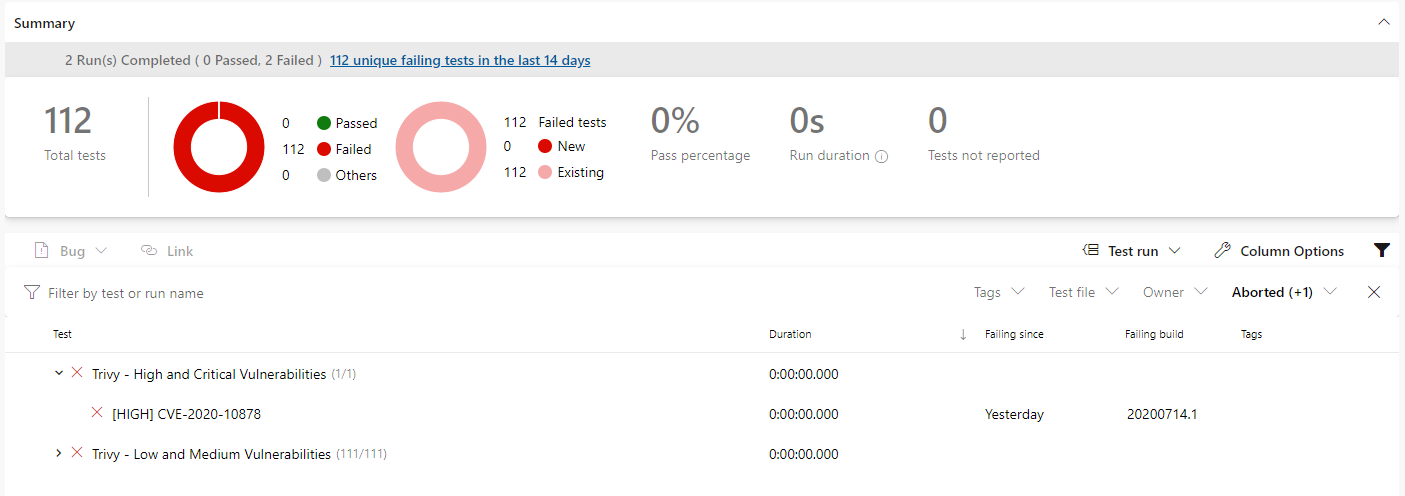
f you click the percentage passed under Tests and coverage you’ll be taken to the test results screen where you will see two test runs.
\