Minikube
Enable systemd in WSL2.
plaintext
$ sudo nano /etc/wsl.conf
plaintext
Add following lines in it and save.
yaml
[boot]
systemd=true
plaintext
Shutdown wsl2 and start it again.
bash
$ wsl --shutdown
$ wsl
plaintext
Installing Docker
bash
$ sudo apt update && sudo apt upgrade -y
plaintext
bash
sudo apt-get install -y \
    apt-transport-https \
    ca-certificates \
    curl \
    software-properties-common
plaintext
bash
curl -fsSL https://download.docker.com/linux/ubuntu/gpg | sudo apt-key add -
plaintext
bash
sudo add-apt-repository \
   "deb [arch=amd64] https://download.docker.com/linux/ubuntu \
   $(lsb_release -cs) \
   stable"
plaintext
bash
sudo apt-get update -y
plaintext
bash
sudo apt-get install -y docker-ce
plaintext
bash
sudo usermod -aG docker $USER && newgrp docker
plaintext
Install Minikube
```bash
Download the latest Minikube
curl -Lo minikube https://storage.googleapis.com/minikube/releases/latest/minikube-linux-amd64
Make it executable
chmod +x ./minikube
Move it to your user’s executable PATH
sudo mv ./minikube /usr/local/bin/
#Set the driver version to Docker minikube config set driver docker ```plaintext
Install Kubectl
```bash
Download the latest Kubectl
curl -LO “https://dl.k8s.io/release/$(curl -L -s https://dl.k8s.io/release/stable.txt)/bin/linux/amd64/kubectl”
Make it executable
chmod +x ./kubectl
Move it to your user’s executable PATH
sudo mv ./kubectl /usr/local/bin/ ```plaintext
Running Minikube
bash
$ minikube start
plaintext
It will take couple of minutes depending upon your internet connection.
If it shows you an error, it could be possible to your WSL2 is out of date as systemd was introduced in Sept-2022.
To fix that
# In powershell type wsl.exe — update and try running minikube start after restarting wsl
Once your minikube starts working, type:
bash
$ kubectl config use-context minikube
plaintext
```bash
Start minikube again to enable kubectl in it
$ minikube start ```plaintext
bash
$ kubectl get pods -A
plaintext
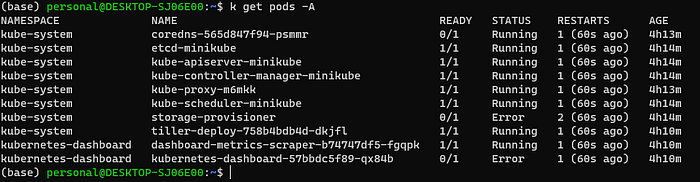
You’ll see something.